效果
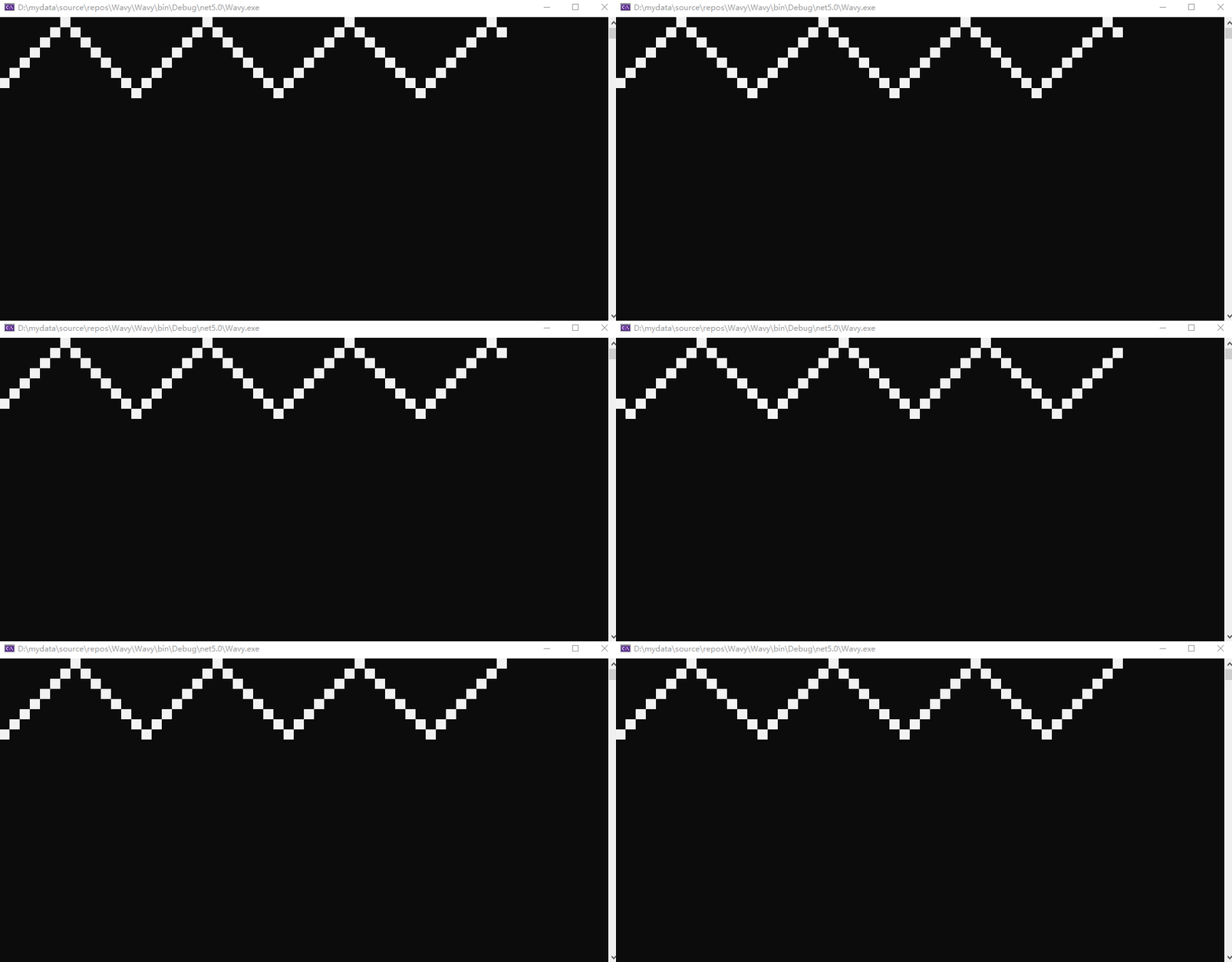
控制台实现的关键接口
设置控制台游标的函数:public static void SetCursorPosition (int left, int top); 其中left参数是列,top参数是行。
设置控制台背景色的属性:public static ConsoleColor BackgroundColor { get; set; } .
代码实现
using System;using System.Threading;namespace Wavy{class Program{private static Cell[,] grid = new Cell[8, 50];static void Main(string[] args){Console.CursorVisible = false;Init();while (true){Update();Thread.Sleep(50);}}private static void Init(){for (int i = 0; i < grid.GetLength(0); i++){for (int j = 0; j < grid.GetLength(1); j++){grid[i, j] = new Cell();if (i == 0){grid[i, j].Value = true;SetBlack(i, j);}else{grid[i, j].Value = false;SetBlack(i, j);}}}}private static void Update(){for (int j = 0; j < grid.GetLength(1); j++){for (int i = 0; i < grid.GetLength(0); i++){if (grid[i, j].Value){grid[i, j].Value = false;SetBlack(i, j);if (grid[0, j].IsDown){int nextRow;if (i == grid.GetLength(0) - 1){grid[0, j].IsDown = false;nextRow = i - 1;}else{nextRow = i + 1;}grid[nextRow, j].Value = true;SetWhite(nextRow, j);}else{int nextRow;if (i == 0){grid[0, j].IsDown = true;nextRow = i + 1;}else{nextRow = i - 1;}grid[nextRow, j].Value = true;SetWhite(nextRow, j);}break;}}if (!grid[0, j].IsStart){grid[0, j].IsStart = true;break;}}}private static void SetWhite(int i, int j){string fill = " ";Console.SetCursorPosition(j * fill.Length, i);Console.BackgroundColor = ConsoleColor.White;Console.Write(fill);}private static void SetBlack(int i, int j){string fill = " ";Console.SetCursorPosition(j * fill.Length, i);Console.BackgroundColor = ConsoleColor.Black;Console.Write(fill);}}public class Cell{public bool Value { get; set; } = false;public bool IsDown { get; set; } = true;public bool IsStart { get; set; } = false;}}
grid 变量是一个二维数组,表示网格,Cell 类表示每个格子。
Cell 类的 Value 属性表示这个格子是否应该高亮,默认为 false;IsDown 属性表示这个格子所在列的运动方向是否向下,默认为 true;IsStart 属性表示这个格子所在列是否已经开始运动,默认为false。
Main() 函数首先隐藏了光标,以免影响观感;调用 Init() 函数初始化网格;之后是主循环,每次循环都调用 Udpate() 函数来更新网格,每次循环间隔默认 50 毫秒。
Init() 函数遍历二维数组来初始化格子,并将第一行的格子设为 true,但是颜色设为黑。其他格子设为 false,颜色设为黑。
Update() 函数以列为外层循环遍历网格。如果当前格子为 false 就跳过,如果为 true,则将当前格子设为false,颜色设为黑,接着计算这一列下一个应该点亮的格子,值设为 true,颜色设为白。计算这一列下一个应该点亮的格子,需要用到Cell的IsDown属性和当前行数。让所有列不同时开始才能实现波浪效果,所以在当前列的所有行遍历完成后,判断当前列是否已经开始,如果已经开始就继续循环下一列,如果没有开始,就将这一列设为开始,并结束循环。
如有错误,欢迎指正,谢谢!