具体的加密算法可以可自行查询其区别,这里只是抛砖引玉,大部分加密方法基本都能通过改变传入参数来实现。
C#加密函数:.
 1 using System;
 2 using System.ComponentModel;
 3 using System.Security.Cryptography;
 4 using System.Text;
 5
 6 namespace Hello
 7 {
 8     class HelloWorld
 9     {
10         //默认的加密密钥,不得少于8位,否则会报错11         private static readonly string key = "password";
12
13         static void Main(string[] args)
14         {
15             String text = HelloWorld.EncryptString("plaintext", key);
16             string decy = HelloWorld.DecryptString("9M2Z9AqQqdfoURRguzzSAA==", key);
17             Console.WriteLine(text);
18             Console.WriteLine(decy);
19         }
20
21         //解密算法22         public static string DecryptString(string decryptString, string decryptKey)
23         {
24             try25             {
26
27                 byte[] rgbKey = Encoding.UTF8.GetBytes(decryptKey.Substring(0, 8));
28                  //初始化偏移向量,因为第一个明文分组没有前一组密文进行异或,所以这里是要有一个初始化向量的 29                 byte[] rgbIV = { 0x12, 0x34, 0x56, 0x78, 0x90, 0xAB, 0xCD, 0xEF };
30                 byte[] inputByteArray = Convert.FromBase64String(decryptString);
31                 using DESCryptoServiceProvider DCSP = new();
32                 MemoryStream mStream = new MemoryStream();
33                 CryptoStream cStream = new CryptoStream(mStream, DCSP.CreateDecryptor(rgbKey, rgbIV), CryptoStreamMode.Write);
34                 cStream.Write(inputByteArray, 0, inputByteArray.Length);
35                 cStream.FlushFinalBlock();
36                 return Encoding.UTF8.GetString(mStream.ToArray());
37             }
38             catch39             {
40                 return decryptString;
41             }
42         }
43
44         //加密算法45         public static string EncryptString(string encryptString, string encryptKey)
46         {
47             try48             {
49                 byte[] rgbKey = Encoding.UTF8.GetBytes(encryptKey.Substring(0, 8));
50                 byte[] rgbIV = { 0x12, 0x34, 0x56, 0x78, 0x90, 0xAB, 0xCD, 0xEF };
51                 byte[] inputByteArray = Encoding.UTF8.GetBytes(encryptString);
52                 using DESCryptoServiceProvider DCSP = new();
53                 MemoryStream mStream = new MemoryStream();
54                 CryptoStream cStream = new CryptoStream(mStream, DCSP.CreateEncryptor(rgbKey, rgbIV), CryptoStreamMode.Write);
55                 cStream.Write(inputByteArray, 0, inputByteArray.Length);
56                 cStream.FlushFinalBlock();
57                 return Convert.ToBase64String(mStream.ToArray());
58             }
59             catch60             {
61                 return encryptString;
62             }
63         }
64     }
65 }
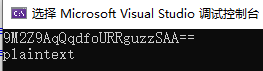
控制台输出为
Node JS加密函数为:
 1 const key = 'password'
 2 const arr = [0x12, 0x34, 0x56, 0x78, 0x90, 0xab, 0xcd, 0xef]
 3 const iv = Buffer.from(arr)
 4
 5 /**
 6  * des-cbc加密函数
 7  * @param plaintext 原文
 8  * @param alg 加密方式,这里统一用cbc加密
 9  * @returns {string} 密文
10  */11 function encrypt(plaintext, alg) {
12     //创建加密对象,参数为13     //加密方式(string), 密钥(string), 初始向量(ArrayBuffer,二进制数组)14     let cipher = crypto.createCipheriv(alg, key, iv);
15
16     //自动填充,否则输入长度不为密码块的倍数时会报错17     cipher.setAutoPadding(true);
18
19     //用加密对象进行加密,参数为20     //data: 原始数据,一般为string,其他类型则忽略输入类型21     //inputencoding: 数据的输入编码方式,这里转换为unicode22     //outputencoding: 数据的输出编码方式,这里是用base64,其特点是存在非3倍数时末尾会出现'='23     //return:返回加密密文,类型为string24     let ciph = cipher.update(plaintext, 'utf8', 'base64');
25
26     //将剩余内容全部进行加密并返回总结果,因为上面的一次只能加密部分数据27     ciph += cipher.final('base64')
28     return ciph
29 }
30
31 /**
32  * des-cbc解密数据
33  * @param ciphertext 密文
34  * @param alg 解密方式
35  * @returns {string} 原文
36  */37 function decrypt(ciphertext, alg) {
38     //解码失败则返回空,因为有些早期数据没有密码39     if(!ciphertext) return ''
40     let dcipher = crypto.createDecipheriv(alg, key, iv);
41     dcipher.setAutoPadding(true);
42     let ciph = dcipher.update(ciphertext, 'base64', 'utf8');
43     ciph += dcipher.final('utf8')
44     return ciph
45 }

//调用
console.log(encrypt('plaintext', 'des-cbc'))
console.log(decrypt('9M2Z9AqQqdfoURRguzzSAA==', 'des-cbc'))
控制台输出为:

注意:因为JS中不存在二进制数据类型,因此需要用到Buffer来转换。基本语法都是这样,若要其他加密算法以及编码方式,则更改对应参数即可,譬如
encrypt('plaintext', 'des-cfb') //cfb加密
let ciph = cipher.update(plaintext, 'utf8', 'hex'); //hex编码方式
个人笔记记录。