这一篇就着重写一下客户端的代码,客户端主要实现的有:启动后检测本地的xml文件,然后发送到服务器获取需要更新的文件以及版本列表。循环下载。下载成功后,备份原始文件->复制到主目录(若失败进行回滚)->修改本地xml文件,更新完成后打开主程序。
开发环境:.NET Core 3.1
开发工具: Visual Studio 2019.
实现代码:
/// <summary>/// 更新自己/// </summary>private void CopyRun() {string runPath = Process.GetCurrentProcess().MainModule.FileName;string runName = Path.GetFileName(runPath);if(!runName.StartsWith("_")) {string copyPath = runPath.Replace(runName, "_" + runName);byte[] bytes;using(FileStream fileStream = new FileStream(runPath, FileMode.Open, FileAccess.Read)) {bytes = new byte[fileStream.Length];fileStream.Read(bytes, 0, bytes.Length);}using(FileStream fileStream = new FileStream(copyPath, FileMode.Create, FileAccess.Write)) {fileStream.Write(bytes);}ProcessStartInfo info = new ProcessStartInfo(copyPath, _runApp);Process.Start(info);Environment.Exit(0);}}/// <summary>/// 更新UI/// </summary>/// <param name="actoin"></param>private void UpdateUI(Action actoin) {if(this.InvokeRequired) {this.BeginInvoke(actoin);}else {actoin();}}/// <summary>/// 获取本地更新地址/// </summary>/// <returns></returns>private string GetUpdateUrl() {XElement xele = XElement.Load(updateXml);string url = xele.Element("url").Value;return url;}/// <summary>/// 获取本地更新文件/// </summary>/// <returns></returns>private string GetUpdateFiles() {XDocument xdoc = XDocument.Load(updateXml);var files = from f in xdoc.Root.Element("files").Elements() select new { name = f.Attribute("name").Value, version = f.Attribute("version").Value };return JsonConvert.SerializeObject(files);}/// <summary>/// 更新完成后修改版本文件/// </summary>/// <param name="list"></param>private void UpdateXml(List<UpdateModel> list) {XDocument xdoc = XDocument.Load(updateXml);foreach(var model in list) {var ele_files = xdoc.Root.Element("files");XElement xele = ele_files.Elements().FirstOrDefault(s => s.Attribute("name").Value == model.name);if(xele != null) {xele.SetAttributeValue("version", model.version);}else {XElement addXele = new XElement("file");addXele.SetAttributeValue("name", model.name);addXele.SetAttributeValue("version", model.version);ele_files.Add(addXele);}}xdoc.Save(updateXml);}
readonly string _runApp;public Form_update(string runApp) {InitializeComponent();_runApp = runApp;//CopyRun();}readonly string updateXml = Application.StartupPath + "UpdateList.xml";private void btn_update_Click(object sender, EventArgs e) {#region 设置uibtn_update.Enabled = false;label_status.Text = "正在更新";#endregion#region 初始化路径string savePath = Application.StartupPath + "temp_update\\";string backPath = Application.StartupPath + "temp_back\\";if(Directory.Exists(savePath)) {Directory.Delete(savePath, true);}Directory.CreateDirectory(savePath);if(Directory.Exists(backPath)) {Directory.Delete(backPath, true);}Directory.CreateDirectory(backPath);#endregion#region 图标旋转int angle = 0;Image img = pictureBox1.BackgroundImage;System.Threading.Timer timer = new System.Threading.Timer(s => {UpdateUI(() => {angle = angle == 360 ? 0 : angle + 10;pictureBox1.BackgroundImage = img.RotateImage(angle);});}, null, 0, 100);#endregion#region 下载更新string url = GetUpdateUrl();bool isSuccess = false;Task.Run(() => {try {//获取下载列表HttpResult httpResult = HttpUtil.HttpRequest(new HttpItem(url + "GetUpdateFiles", requestData: GetUpdateFiles()));if(httpResult.Status) {UpdateModel_Out output = JsonConvert.DeserializeObject<UpdateModel_Out>(httpResult.HttpStringData);if(output.updateList.Count == 0) {throw new Exception("当前已是最新版本");}UpdateUI(() => {progressBar1.Maximum = output.updateList.Count + 1;});//循环下载文件for(int i = 0; i < output.updateList.Count; i++) {UpdateModel updateModel = output.updateList[i];#region 进度条UpdateUI(() => {label_status.Text = $"正在更新第 {i + 1}/{output.updateList.Count} 个文件,文件名:{updateModel.name}";progressBar1.Value = i + 1;});#endregion#region 下载文件httpResult = HttpUtil.HttpRequest(new HttpItem(url + "DownloadFile", requestData: JsonConvert.SerializeObject(updateModel)));if(httpResult.Status) {using(FileStream fileStream = new FileStream(savePath + updateModel.name, FileMode.Create)) {fileStream.Write(httpResult.HttpByteData, 0, httpResult.HttpByteData.Length);}}else {throw new Exception(updateModel.name + "下载失败,请重试");}#endregionTask.Delay(1000).Wait();}#region 备份UpdateUI(() => {label_status.Text = "正在备份";});try {File.Copy(updateXml, backPath + "UpdateList.xml");foreach(var file in output.updateList) {if(File.Exists(Application.StartupPath + file.name)) {File.Copy(Application.StartupPath + file.name, backPath + file.name, true);}}}catch { }#endregion#region 完成更新UpdateUI(() => {label_status.Text = "正在完成更新";progressBar1.Value = progressBar1.Maximum;});string[] files = Directory.GetFiles(savePath);try {#region 更新成功foreach(string file in files) {File.Copy(file, Application.StartupPath + Path.GetFileName(file), true);}Directory.Delete(savePath, true);#region 保存最新版本UpdateXml(output.updateList);isSuccess = true;UpdateUI(() => {label_status.Text = "更新完成";});#endregion#endregion}catch {#region 失败回滚UpdateUI(() => {label_status.Text = "更新失败,正在回滚";});string[] files_back = Directory.GetFiles(backPath);foreach(string file in files_back) {File.Copy(file, Application.StartupPath + Path.GetFileName(file), true);}File.Copy(backPath + "UpdateList.xml", updateXml, true);UpdateUI(() => {label_status.Text = "回滚完成";});return;#endregion}#endregion}else {throw new Exception("获取更新列表失败");}}catch(Exception ex) {UpdateUI(() => {label_status.Text = "更新失败!" + ex.Message;btn_update.Enabled = true;});}finally {UpdateUI(() => {timer.Change(-1, -1);pictureBox1.BackgroundImage = img;if(isSuccess) {if(File.Exists(_runApp)) {if(MessageBox.Show("更新完成,是否打开程序", "提示", MessageBoxButtons.YesNo, MessageBoxIcon.Question) == DialogResult.Yes) {Process.Start(_runApp);}Environment.Exit(0);}}});}});#endregion}private void btn_close_Click(object sender, EventArgs e) {Close();}private void panel1_Paint(object sender, PaintEventArgs e) {Pen pen = new Pen(Color.LightGray);e.Graphics.DrawLine(pen, new Point(36, 36), new Point(panel1.Width - 36, 36));}
实现效果:
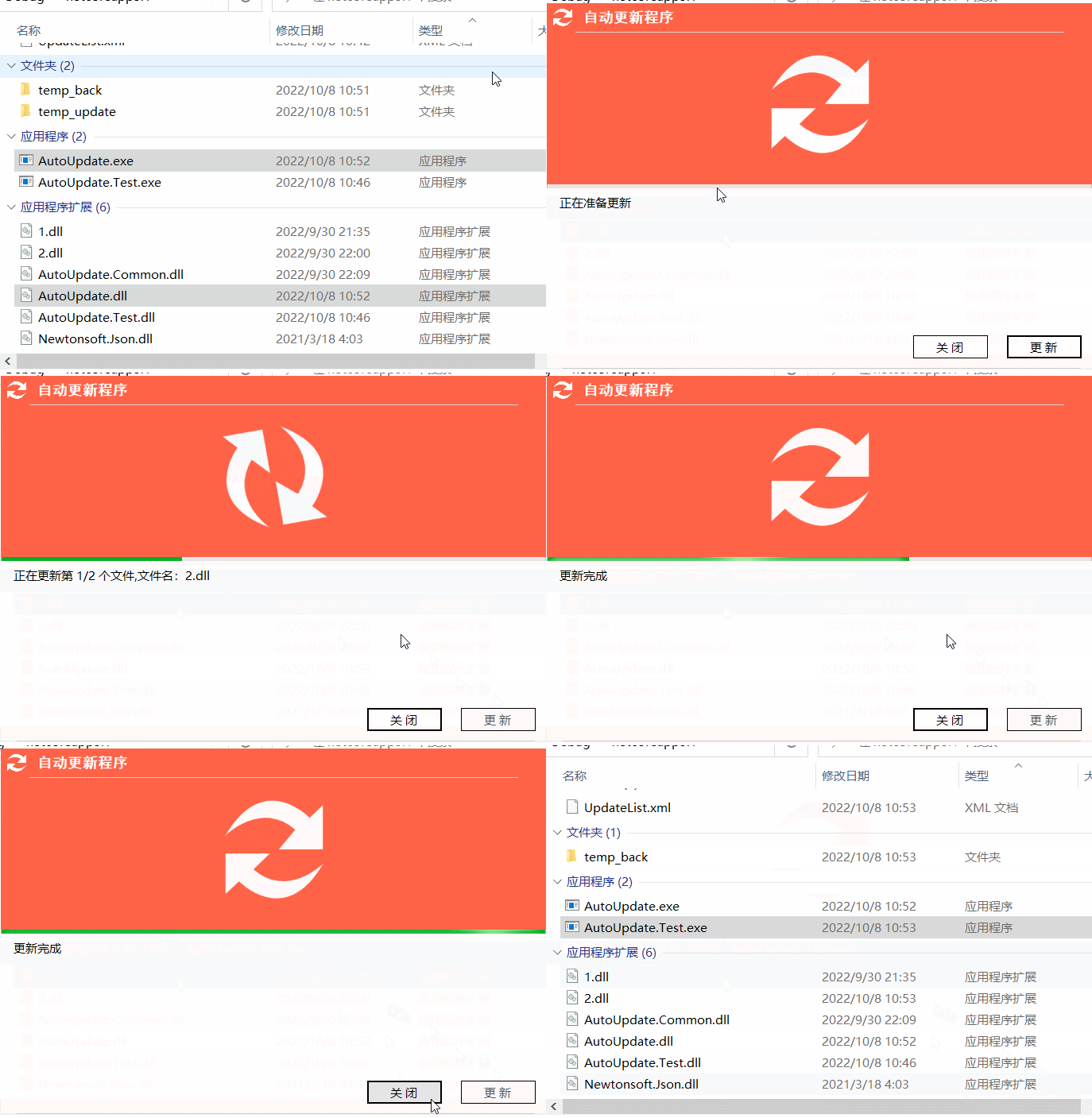
代码解析:主要注释已经在代码中标注了,由于基本都是在线程中进行操作的,所以在更新UI的时候封装了UpdateUI方法,然后就是加了一个定时器实现图标的旋转。关于CopyRun(更新自己)方法,就是用来更新自动更新程序本身的,即运行之前复制一份本身,然后启动复制的程序,否则本身正在运行的时候是不能更新自己的。